v10 Release – The beauty one

n98-magerun2 v10.0.0 (codename is Worms – My own hometown) is out, and it’s the release that finally cleans up some baggage we’ve been carrying for a while — while also giving the whole CLI a visible facelift. The minimum PHP requirement moves to 8.2, the deprecated install command is gone for good, and it’s replaced by a proper interactive download command for Magento, Adobe Commerce, and Mage-OS. Nearly every command now looks and feels more polished thanks to the Laravel Prompts library, table output got new formats and a cleaner layout, and the interactive mode has been fine-tuned throughout. On top of that, you get new commands for testing email deliverability, listing your API routes, generating dummy customers again, and managing websites, store groups, and store views interactively. This is a major version bump, and it acts like one — read the breaking changes before you update anything in production.
Breaking Changes
Let’s get the uncomfortable part out of the way first, since that’s what a major version is for.
- PHP 8.2 is now the minimum requirement. If you’re still running n98-magerun2 on PHP 8.1 or older, v10.0.0 is not for you — stay on the 9.x branch until you’ve upgraded your PHP version, or update your dependencies accordingly.
- The
installcommand has been removed. We flagged this back in v9.5.0 with a deprecation notice, and now it’s gone. Its replacement is the new interactive download command described below — the workflow is similar, but the command name and some options have changed.
If you have scripts or CI pipelines calling n98-magerun2.phar install, this release will break them. Update those references before you roll this out.
What’s New
A Cleaner, More Beautiful CLI
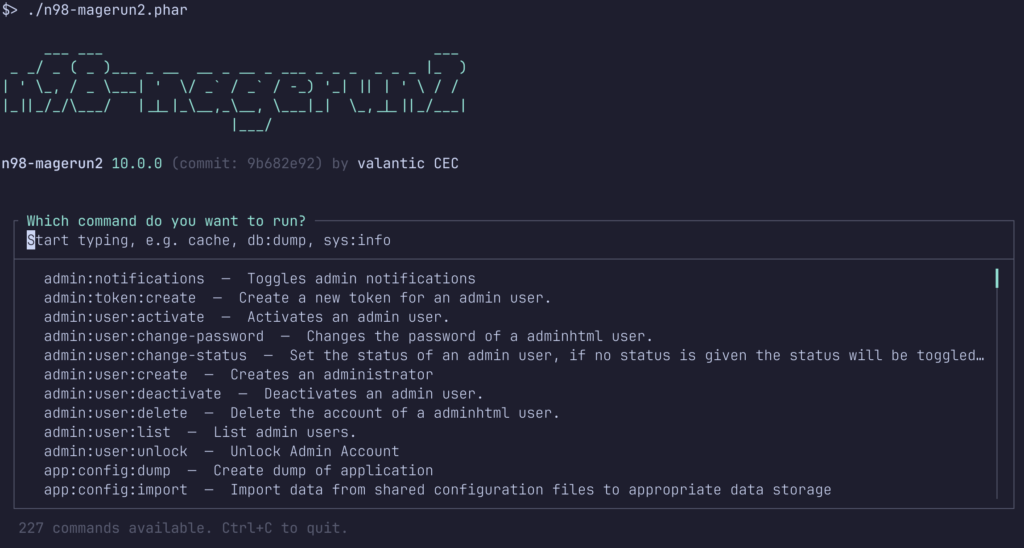
This is the release where n98-magerun2 gets a proper facelift. Nearly all commands now render their interactive prompts through the Laravel Prompts library instead of Symfony’s plain question helpers — the difference in day-to-day use is bigger than a changelog line suggests. Selections, confirmations, and text inputs all get a consistent, modern look with better keyboard navigation, and the interactive mode across the board has been fine-tuned based on real usage rather than just “it technically works.”
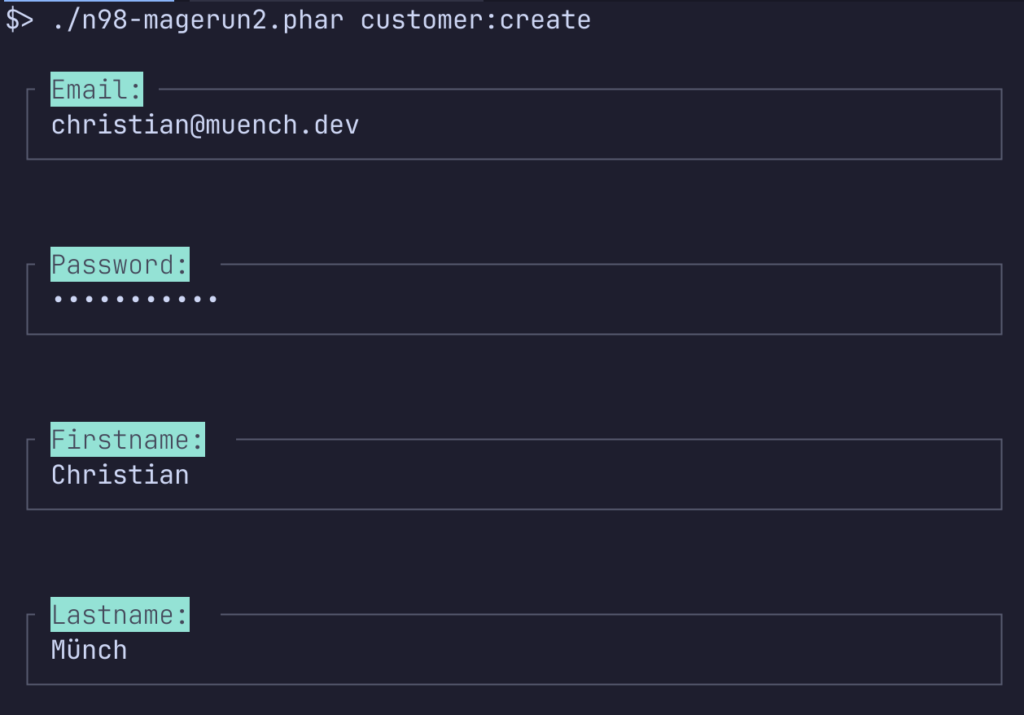
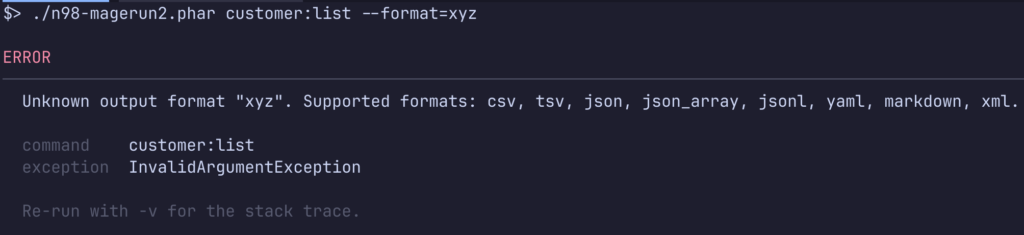
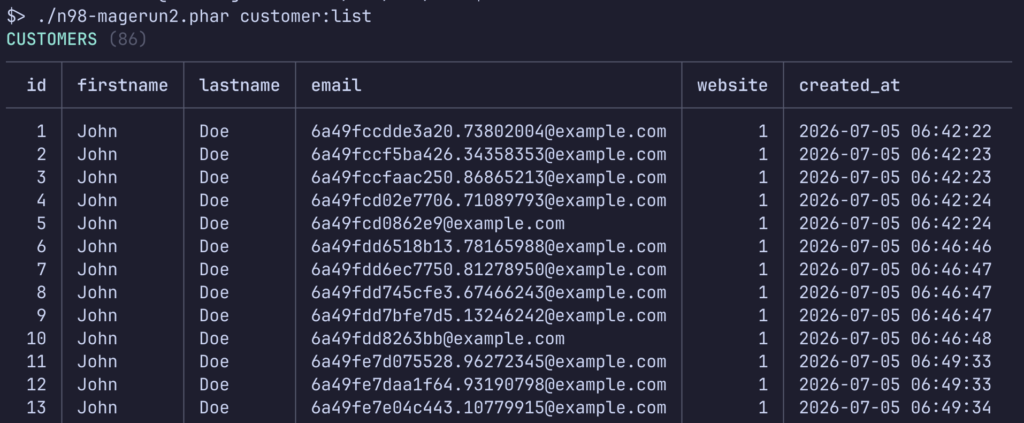
It doesn’t stop at prompts, though. Command help output, error messages, and tables all got the same visual treatment. --help on any command is easier to read at a glance, error messages are clearer and better formatted instead of a wall of stack-trace-adjacent text, and table output got reworked styling — clearer borders, better spacing, easier to scan — plus new output formats beyond the default table view (more on that below).
Exmple of the new error output:
Example of the new table style:
New Output Formats for Tables and Lists
Table and list commands now support a --format option, so you’re no longer stuck with the default terminal table when you need the data somewhere else:
Output Format. One of [csv,tsv,json,json_array,jsonl,yaml,markdown,xml]. Aliases: yml,md,ndjsonThat’s eight formats, with a few convenient aliases:
csv/tsv— for spreadsheets or quick shell pipelines (awk,cut,grep)json— a single JSON object, handy for consuming withjqor feeding into other toolsjson_array— the same data as a JSON array, useful when you specifically need an array-of-objects shapejsonl(aliasndjson) — newline-delimited JSON, one record per line, great for streaming into log processors or ingesting row by rowyaml(aliasyml) — for config files or anything YAML-based downstreammarkdown(aliasmd) — for dropping straight into documentation, GitHub issues, or a wiki pagexml— for legacy tooling or integrations that still expect XML

In practice, that means something like this:
bash
./n98-magerun2.phar routes:api:list --format=json > api-routes.json
./n98-magerun2.phar sys:store:list --format=csv > stores.csv
./n98-magerun2.phar module:list --format=markdown
The last one is a nice trick if you want to paste a module list straight into a pull request description or a status report — no manual reformatting needed.
A New Interactive Download Command
Note: This replaces the removed
installcommand as the way to get a fresh Magento, Adobe Commerce, or Mage-OS installation onto your machine.
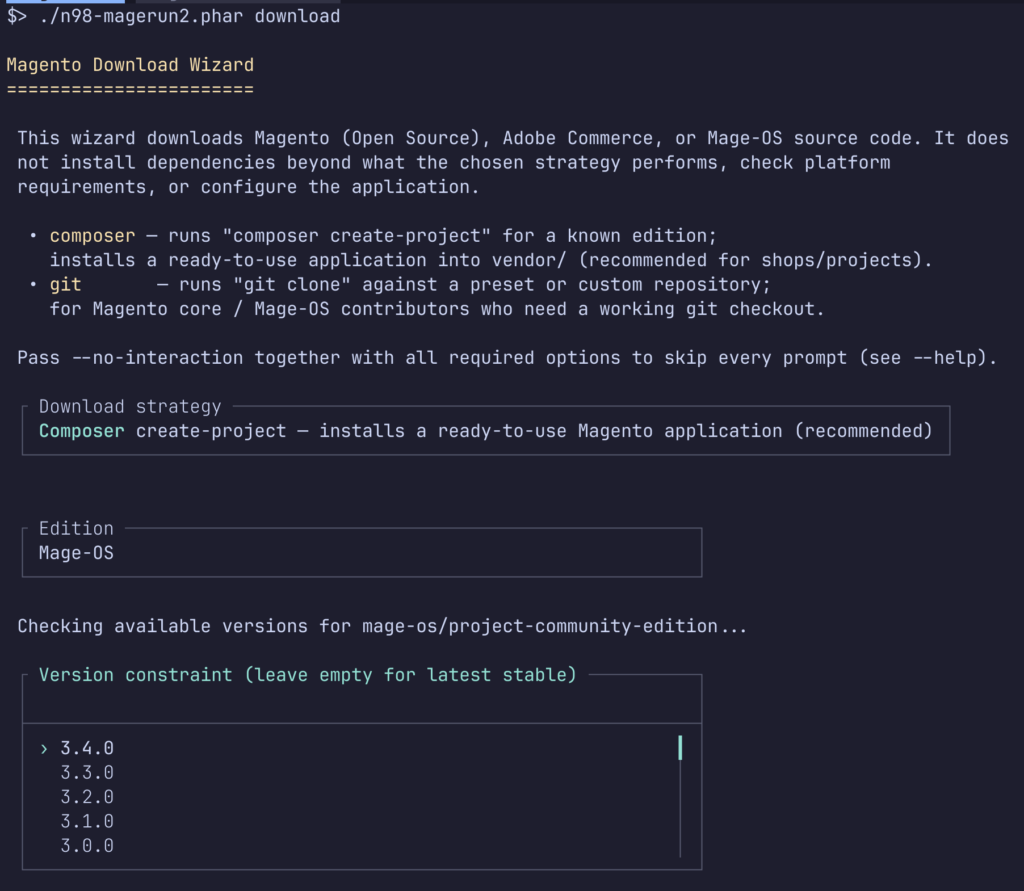
Instead of one command trying to do installation and download in a single, somewhat rigid flow, the new downloader focuses on getting the right source code onto disk and walks you through the available versions and editions interactively:
./n98-magerun2.phar download
Run it without arguments and you’ll be prompted for the platform (Magento Open Source, Adobe Commerce, or Mage-OS) and the version you want. If you already know what you need, you can of course skip the prompts with the appropriate options — check --help on the command for the current flag list, since this is a new command and the interface may still see small adjustments in patch releases.
New Command: sys:email:test
Ever deployed a shop and then wondered whether transactional emails actually go out? This command sends a test email through Magento’s configured mail transport so you can verify deliverability without triggering a real order or password reset:
./n98-magerun2.phar sys:email:test [email protected]
Handy for verifying SMTP configuration after a server migration or a change in your email service provider, without having to trigger an actual customer-facing event.
New Command: routes:api:list
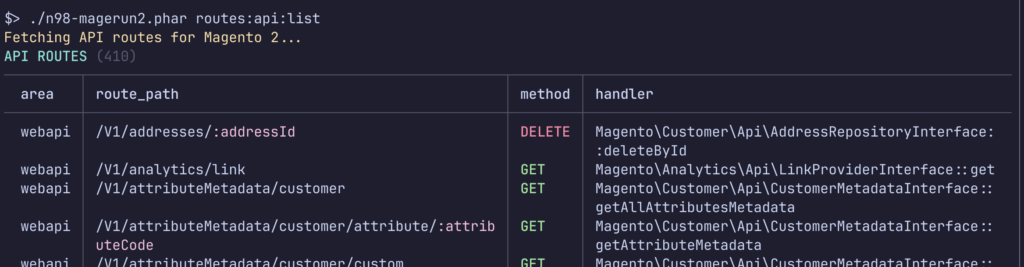
We already had routes:list for frontend/admin routes. Now there’s a dedicated command for your REST/GraphQL API surface, listing every registered API route together with the module that owns it:
./n98-magerun2.phar routes:api:list
This is useful when you’re auditing which modules expose which endpoints — especially on projects with a lot of third-party extensions where nobody quite remembers what’s registered anymore.
New Command: customer:create:dummy
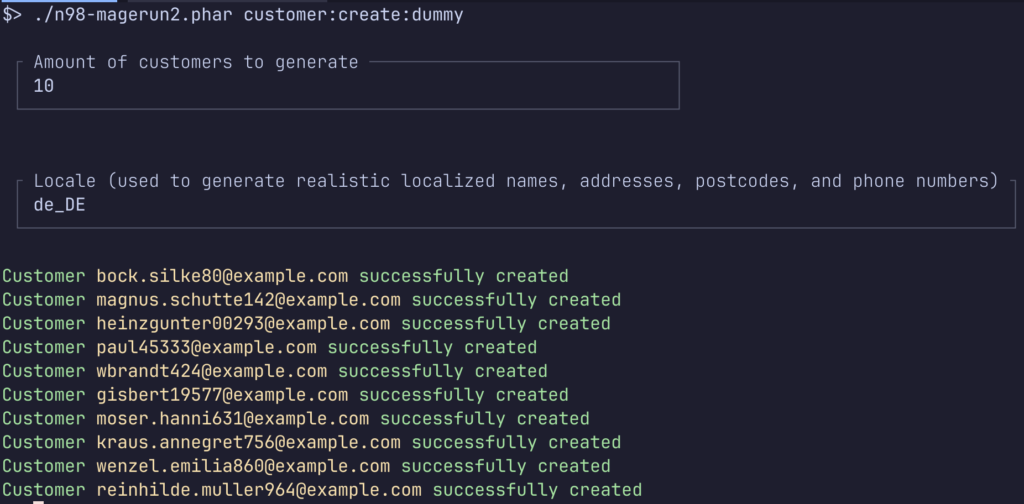
A community favorite from the original n98-magerun for Magento 1 is finally ported to n98-magerun2. Generate a batch of mock customer profiles for local development or load testing, with locale-aware fake data:
./n98-magerun2.phar customer:create:dummy 10 en_US
The first argument is the number of customers to create, the second is the locale used to generate the fake data. Great for spinning up a realistic-looking dataset without touching a production export.
Website, Store Group & Store View Management
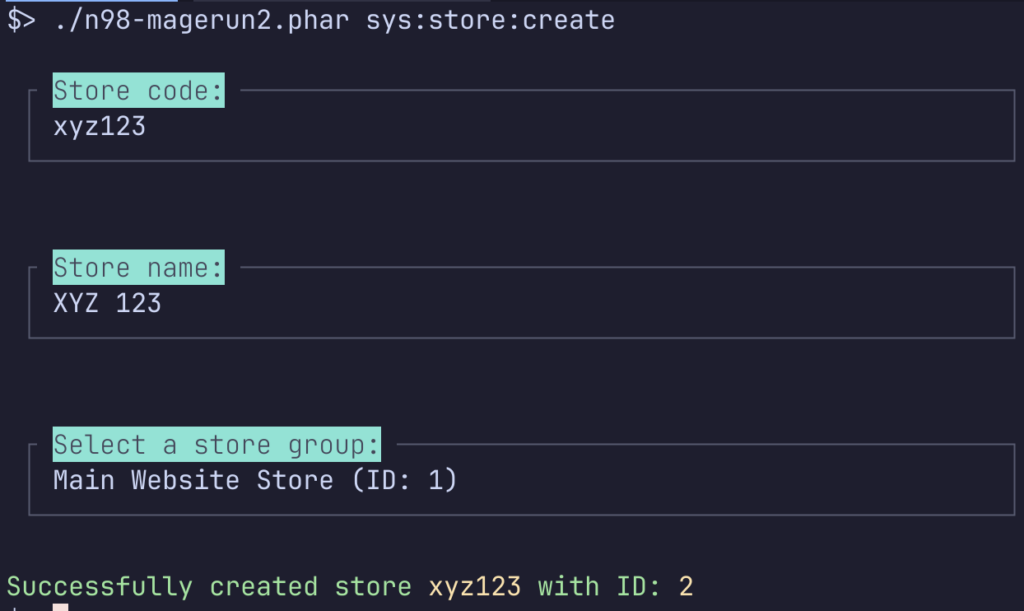
n98-magerun2 gets a full set of new commands for managing the Magento store hierarchy — websites, store groups, and store views — directly from the CLI, with interactive prompts guiding you through the required fields instead of forcing you to remember every argument up front:
./n98-magerun2.phar sys:website:create
./n98-magerun2.phar sys:website:delete

./n98-magerun2.phar sys:store-group:create
./n98-magerun2.phar sys:store-group:delete

./n98-magerun2.phar sys:store:create
./n98-magerun2.phar sys:store:delete
| Command | Description |
|---|---|
sys:website:create | Create a new website |
sys:website:delete | Delete an existing website |
sys:store-group:create | Create a new store group |
sys:store-group:delete | Delete an existing store group |
sys:store:create | Create a new store view |
sys:store:delete | Delete an existing store view |
If you’ve ever set up a multi-store environment by hand in the admin panel, this is for you — run through sys:website:create, sys:store-group:create, and sys:store:create in sequence and you have a fully wired-up new store without touching the backend UI once.
Note: This should not replaces the store setup via config.php
Improvements
- Interactive prompts everywhere:
integration:createandintegration:delete, customer address creation, and admin user activation all gained interactive prompts, so you don’t have to memorize argument order for commands you run twice a year. - New table/list output formats: Table and list commands gained a proper
--formatoption with support forcsv,tsv,json,json_array,jsonl(aliasndjson),yaml(aliasyml),markdown(aliasmd), andxml— no more scraping the default table output withawkwhen you need structured data for a script or report. See the dedicated section below for details. - Reworked table styling: Table output across the tool has a cleaner, more readable layout — better for scanning results quickly in a terminal.
- Laravel Prompts everywhere: Nearly every interactive command now uses the Laravel Prompts library, giving the whole CLI a more polished, consistent look.
- Fine-tuned interactive mode: The overall interactive experience has been optimized based on real-world use — fewer rough edges when you’re stepping through prompts.
Bug Fixes
This release also ships a batch of robustness fixes:
- Various database query fixes for improved reliability
- Corrected MCP proxy behavior
- Fixed an issue with customer B2B deletion
- Closed a plaintext password exposure issue in command output — worth updating for this alone if you’re running n98-magerun2 in shared or logged environments
- Fixed indexer namespace handling
Full Changelog
Break
- Raise minimum PHP requirement to 8.2 (and update dependencies)
- Remove the deprecated
installcommand
Add
- Interactive download command for Magento/Adobe Commerce/Mage-OS
sys:email:testcommand to test deliverabilityroutes:api:listcommand to view all registered API routes and modulescustomer:create:dummycommand (ported from n98-magerun 1) to generate mock customer profiles- Management commands for website, store group, and store view with interactive prompts
Imp
- Support interactive prompts for
integration:create/delete, customer address, and admin user activation - Overhaul command output look and feel, and add table export formats
Fix
- Various command robustness improvements (database queries, MCP proxy, customer B2B deletion, plaintext password exposure, indexer namespace)
Test
- Improve test coverage and idempotency (bats, download, query, admin status)
Security
- Gate
pull_request_targetCI behind maintainer approval
Docs
- Update documentation for new and improved commands (website/store, db-dump, routes:api:list, email:test)
Build
- Update actions, platform tests, and development dependencies
How to Update
As always, the easiest way to update is via the built-in self-update command:
./n98-magerun2.phar self-update
If you’re still on PHP < 8.2, hold off — install the latest 9.x release instead until your environment is ready.
Wrapping Up
v10.0.0 is the kind of release that trades a bit of short-term pain — dropping PHP 8.1, retiring install — for a cleaner foundation and some genuinely useful new commands. The interactive downloader and the store hierarchy management commands in particular should save real time on fresh setups and multi-store projects. Give it a spin, and let us know what you think — drop a comment below or open a discussion on GitHub.
A special thanks to Alexander Dite for testing this release and helping with QA — a major version bump like this needs extra eyes on it, and that help is appreciated.

0 Comments